00 · Prologue: a pair of earbuds that wouldn’t talk to a Mac
The problem
It started with one sentence: “I have a realme Buds Air 7. All features are available on Android, but on the Mac they’re not. What can we do?”
On a phone, the realme Link app shows each bud’s battery. It switches between noise cancelling, transparency and off, and picks how strong the cancelling is. It changes the EQ, turns on spatial audio and a “volume enhancer”, and lets you choose what each tap does. On a Mac you get none of that. The buds play music and take calls, but every setting is invisible. realme doesn’t make a Mac app.
The first honest answer was “set things up on your phone; most settings are stored on the buds, so they carry over”. The reply was: “Any software thing we can do? I guess we can pull it off.”
This manual is the record of pulling it off. It covers how a Mac learned to speak to a pair of earbuds that were never designed to talk to it. Then it covers how one app, Earshot, grew to speak to earbuds from seven brands. We explain everything on the way down: sound, electrons, radio waves, Bluetooth, bytes and protocols. Then everything on the way back up: Swift, SwiftUI, testing, signing and shipping.
Why the Mac couldn’t already do it
Connecting earbuds to a Mac sets up audio: music one way, the microphone the other, and play/pause buttons. Settings aren’t audio. They’re private messages between the companion app and the buds’ firmware, sent over a separate, vendor-specific channel. macOS has never heard of that channel and never opens it. Chapter 04 explains exactly where that line is drawn.
So the question became: can a Mac open that channel and speak the buds’ language?
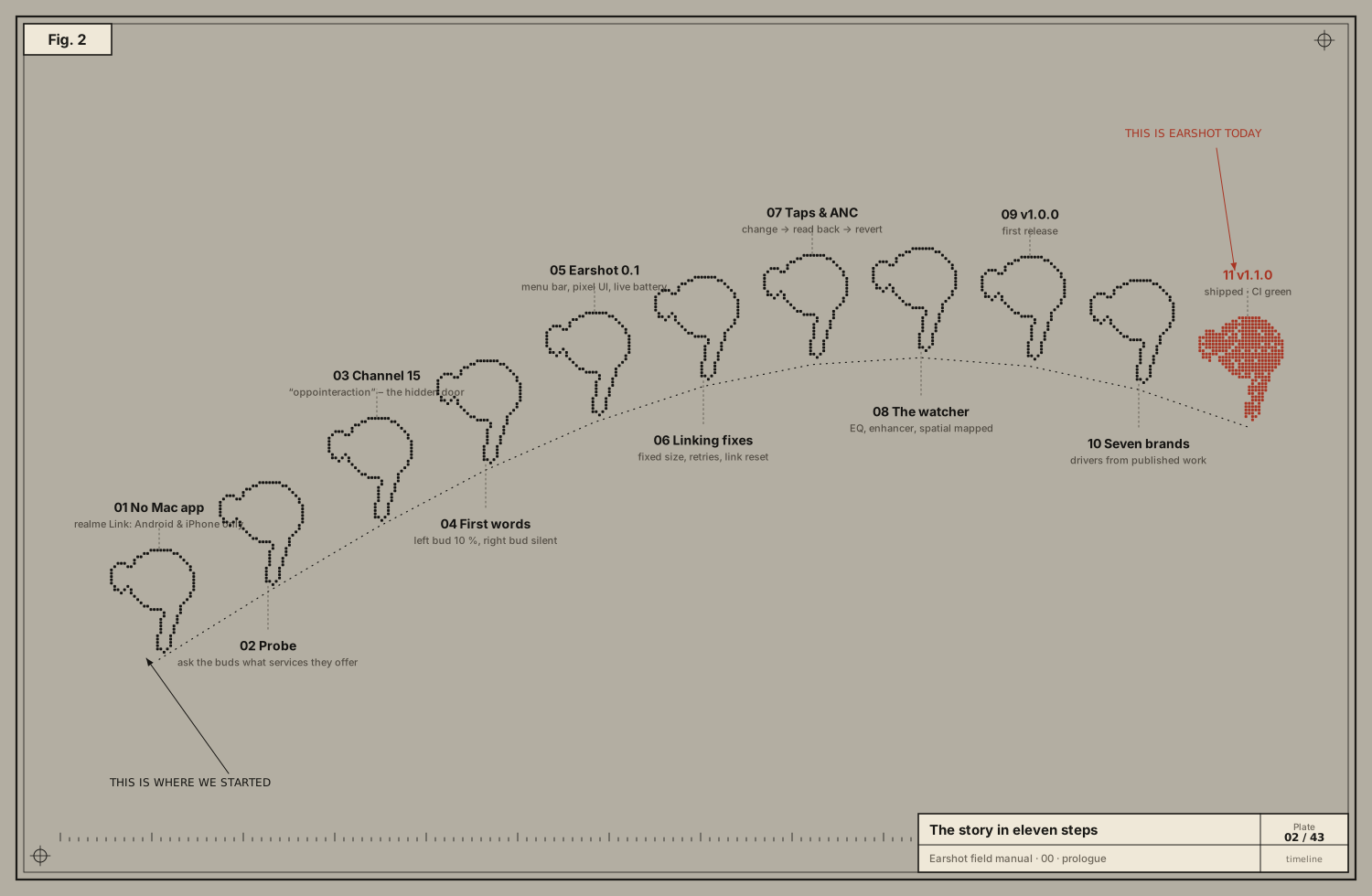
The story, step by step
1 · No Mac app. realme Link exists only for Android and iPhone.
2 · Probe. The first idea was Bluetooth Low Energy (BLE). Many buds expose their settings over BLE GATT services. realme, OPPO and OnePlus share a parent company, BBK Electronics, and share a control protocol. Someone had already reverse-engineered it for OnePlus Buds, and the open-source Android app Gadgetbridge already supported some realme buds. A small Swift program, probe.swift, was written to list every service the buds offer. macOS wouldn’t let it touch Bluetooth from inside the assistant’s sandbox: the system’s privacy layer (TCC) shut it down. So it was run from Terminal.app, which could ask for Bluetooth permission.
3 · Channel 15. The buds’ service list included an entry named oppointeraction with a 128-bit UUID starting 0000079A. It isn’t a BLE service: it’s classic Bluetooth RFCOMM, channel 15. That was the door.
4 · First words. A second test program, rfcomm.swift, opened channel 15 and sent the battery question from Gadgetbridge’s OPPO code. The buds answered:
| Asked | The buds said |
|---|---|
| Left bud | 10 % battery |
| Right bud | (no answer: it was flat) |
| Case | 0, i.e. unreadable because the buds were out |
| Noise control | ANC on |
| Firmware | 1.1.0.62 on both buds |
That matched reality exactly: left bud low, right bud dead. The Mac was reading real values from the buds. One quirk showed up immediately: the channel often refused the first open after the buds connected, and accepted the second.
5 · Earshot 0.1. Next came a real app, a menu-bar popover in the user’s design language. It used oauth-ready’s pink, ink and grain-green palette, pixel-art sprites drawn from bitmaps, a briefing-sheet grid and a procedural grain texture. It showed live battery for each bud and the case, in-ear status, and Off / Ambient / ANC switching. It also had game mode, dual-device, find-my-buds and launch at login.
6 · Linking fixes. Two bugs appeared in real use.
- Stuck on “linking” while the buds were plainly connected. The app was holding an outdated
IOBluetoothDeviceobject, and a force-quit copy had left the channel half-open, so the buds refused newcomers. The fixes:- always fetch the current device object;
- retry with growing delays;
- reset the Bluetooth link if retries keep failing;
- close the channel cleanly on quit, even on SIGTERM.
- Flicker: the popover resized when its content changed, and macOS redrew it at the wrong size for a frame. The fix was a fixed size. Controls never move; they dim until linked.
After the fixes, three kill-and-reopen cycles linked in about 0.15 s each.
7 · Taps and ANC strength. The user asked for everything realme Link has: EQ, “LHDC 5.0” Hi-Res audio, volume enhancer, spatial audio, and button customisation, “but don’t make our visuals cluttered”. The popover grew three tabs (Buds, Sound, Taps) at the same fixed size.
- Tap controls and ANC strength were documented in Gadgetbridge. They were still tested on the real buds by changing one thing, reading everything back, and reverting.
- That loop caught a real bug before it shipped: the first touch encoder had two bytes in the wrong order and would have changed the wrong gesture. Chapter 06 tells that story.
8 · The watcher. EQ, volume enhancer and spatial audio weren’t documented anywhere for realme. The buds reported 14 unlabelled settings. Guessing could flip the wrong one, so we watched instead:
- With dual-device on, the phone and the Mac were connected at the same time.
- A read-only program on the Mac polled every setting while the user changed one feature at a time on the phone.
- The user reported the order: enhancer was on → off → on; spatial off → on → off; EQ Deep bass → Serenade → Original → Clear bass → Deep bass.
Every change on the phone appeared as exactly one changed value on the Mac.
9 · v1.0.0. The user disliked the notification toasts (“so unneeded, horrible”), so errors moved to the header subtitle. Flicker on opening was fixed, README screenshots were rendered live from the app, and Earshot v1.0.0 was released on GitHub, followed by v1.0.1.
10 · Seven brands. Then: “Most earbuds that are not Apple — OPPO, realme, Samsung — and all the earphones sold in India and English-speaking countries. I don’t have them. Is that doable?”
It is doable, carefully. Published, open protocol work already existed for Samsung (GalaxyBudsClient, Gadgetbridge), Sony, Nothing and Anker soundcore (Gadgetbridge), including messages captured from real devices.
- Earshot was rebuilt around a brand-neutral model and one driver per protocol family.
- Every driver’s parser was tested against those captured messages.
- Every brand except the one we own is labelled beta.
- A Report button lets owners send a byte-level log, so each one can be confirmed.
11 · v1.1.0. Shipped, with CI green.
How to read this manual
Each chapter starts from first principles and ends at Earshot’s actual code. You can read straight through, or jump in:
- To understand the hardware, start at 01 · Anatomy.
- To understand bits and bytes from zero, read 02.
- To understand wireless, read 03 · Radio and 04 · The Bluetooth stack.
- To build your own device-talking tool, read 05, 06, 07 and 08.
- To understand Earshot’s code, read 09, 10 and 11.
- Unfamiliar word? 12 · Glossary.
Every byte drawn in the plates is real: either captured from the realme Buds Air 7 (and kept as test vectors in Earshot’s ProtocolTests.swift) or computed with the same arithmetic as Earshot’s drivers. Where a value is only illustrative, such as Bluetooth connection handles that change on every connection, the plate says so.