04 · The Bluetooth stack
In the story: the buds were already “connected” to the Mac and playing music, yet none of the settings were reachable. The reason is in the layers of the Bluetooth stack, and in which of them macOS chooses to open.
Radio gets bits across the air. But “bits across the air” is a long way from “set ANC to deep”. In between sit several layers, each solving one problem and hiding it from the layers above. Together they’re called a stack.
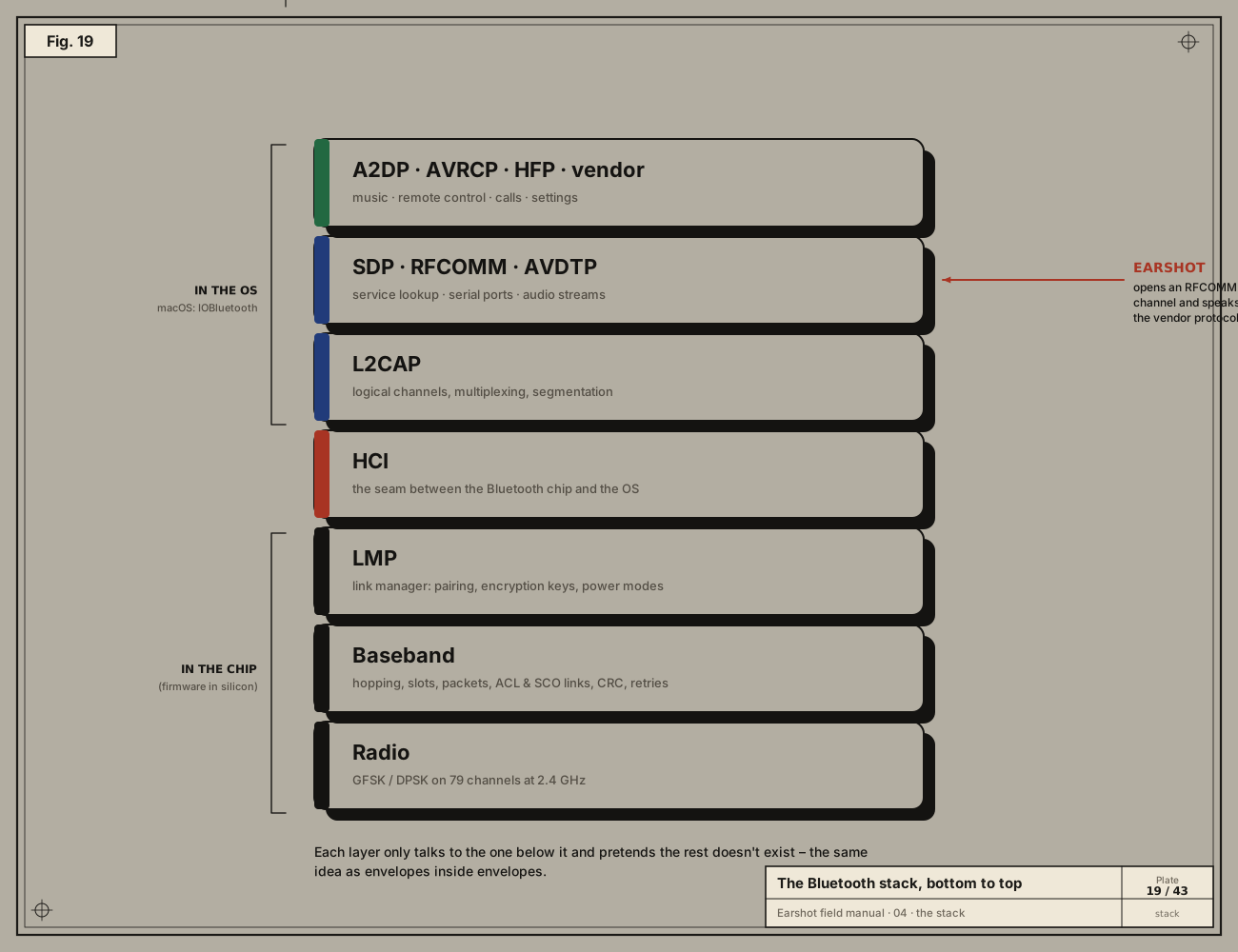
In the chip: the controller
The bottom three layers live in the Bluetooth chip itself, as firmware burned into silicon.
- Radio (PHY): the physical layer: GFSK/DPSK modulation on 79 channels (chapter 03).
- Baseband / link controller: slots, hopping, packet formats, error detection and automatic retransmission. It manages two kinds of logical link:
- ACL (asynchronous connection-less) for data: our commands, and A2DP music, travel on ACL.
- SCO/eSCO (synchronous) for real-time voice in calls.
- LMP, link manager protocol: the two chips negotiating. Pairing, encryption keys, power-saving modes, which packet types to use.
The seam: HCI
The Host Controller Interface (HCI) is a standard command and data format between the Bluetooth chip and the computer’s operating system.
- On a Mac, macOS sends HCI commands (“connect to this address”) and ACL data packets to the chip, and receives events and data back.
- Apple’s PacketLogger tool (part of Xcode’s Additional Tools) records this traffic, which makes HCI the classic place to observe Bluetooth from software.
In the OS: the host
- L2CAP, logical link control and adaptation: many logical channels over one ACL link, each identified by a CID (channel ID). It also chops big messages into pieces that fit packets, and reassembles them.
- SDP, service discovery protocol: the device’s table of contents. “Which services do you offer, and how do I reach them?” (chapter 05).
- RFCOMM: emulates old RS-232 serial ports over L2CAP. A device can offer up to 30 numbered server channels, and each behaves like a simple two-way pipe of bytes. Earshot talks on one of these: channel 15.
- AVDTP: sets up and carries audio streams, used by A2DP.
Profiles: what the stack is for
A profile is an agreed use of the stack:
| Profile | What it does |
|---|---|
| A2DP (Advanced Audio Distribution) | Stereo music, one way, compressed by a codec. |
| AVRCP (A/V Remote Control) | Play, pause, skip, absolute volume. |
| HFP (Hands-Free) | Phone calls: microphone and speaker, low bandwidth. |
| SPP (Serial Port Profile) | A generic RFCOMM serial link. |
Plus anything a manufacturer invents. realme’s control service is a vendor-specific RFCOMM service with its own 128-bit UUID.
Envelopes inside envelopes
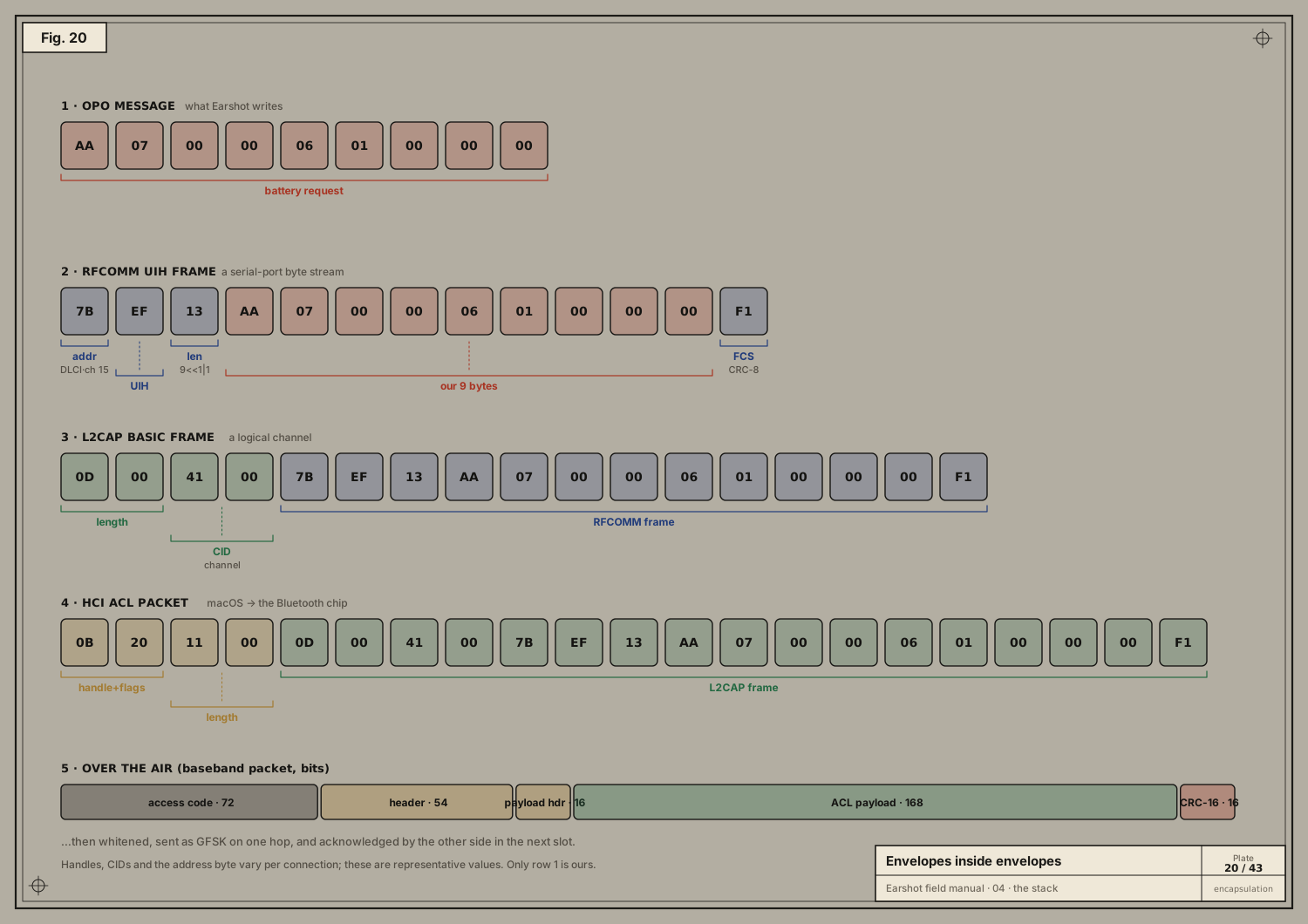
Here is the 9-byte message Earshot sends to ask for the battery level, and what each layer wraps around it on its way down:
- Our message (OPO):
AA 07 00 00 06 01 00 00 00. - RFCOMM UIH frame:
- an address byte naming the channel (its DLCI is derived from channel 15);
- a control byte (
EF= UIH, unnumbered information with header check); - a length (9, written
9 << 1 | 1because the low bit flags a one-byte length); - our bytes;
- a one-byte FCS (frame check sequence, a CRC-8 over the header).
- L2CAP basic frame: a 2-byte length and a 2-byte CID in front.
- HCI ACL packet: a connection handle plus flags, and a length.
- Over the air:
- an access code (derived from the central’s address, so other piconets ignore it);
- a header;
- the payload;
- a CRC-16.
The whole packet is then whitened (scrambled to avoid long runs of identical bits) and GFSK-modulated on one hop.
The handle, CID and address values differ per connection; the plate shows representative ones. Only the first row is ours. The rest is done by macOS and the chip. When Earshot calls
channel.writeSync(&bytes, length: UInt16(bytes.count))all of rows 2–5 happen without us.
Why a Mac plays music but can’t change settings
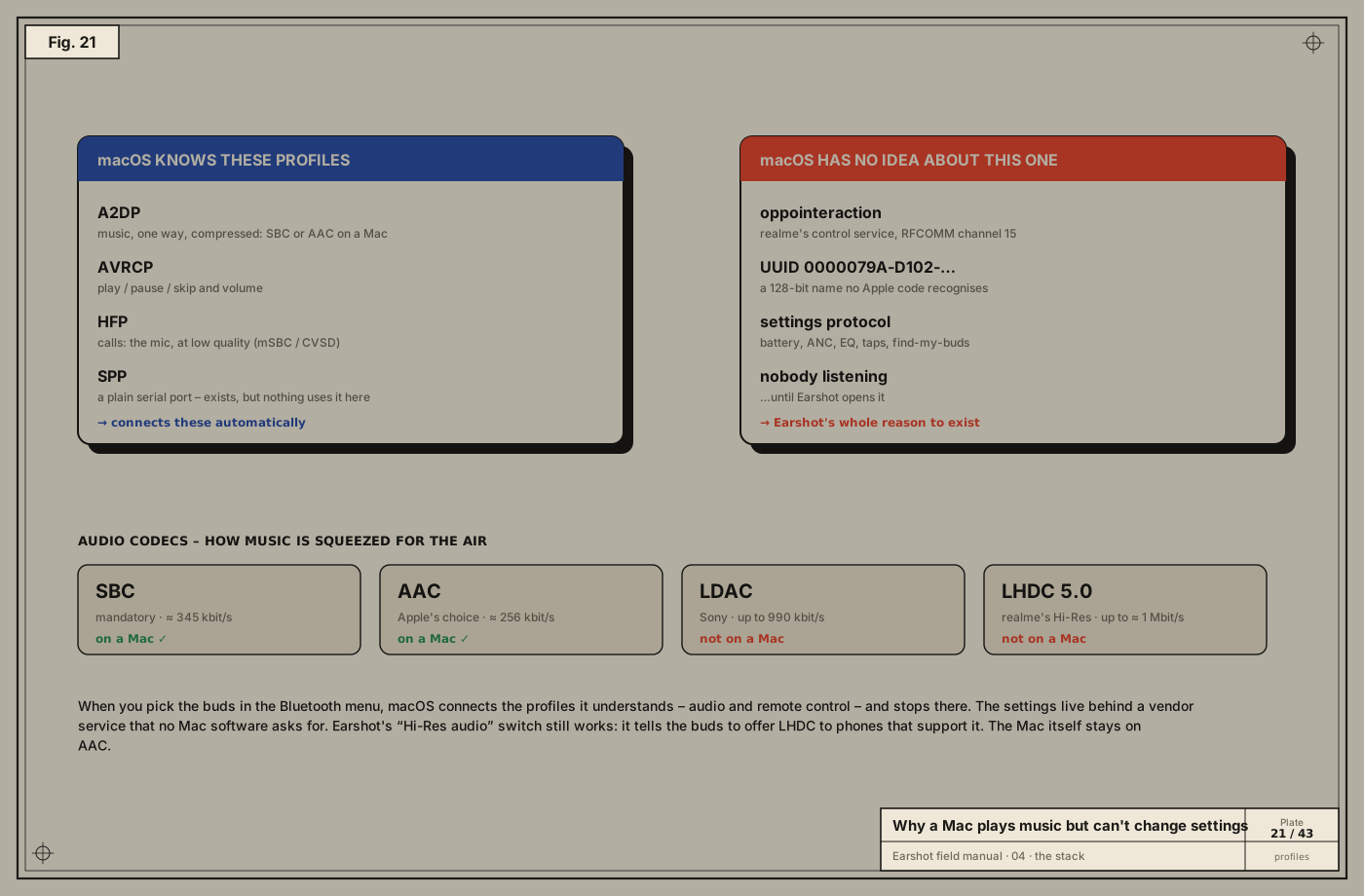
When you click the buds in the Bluetooth menu, macOS:
- connects the ACL link and encryption,
- opens A2DP for music, AVRCP for controls and HFP for calls,
- …and stops.
It has no reason to open realme’s vendor service. No Apple code knows what UUID 0000079A-D102-11E1-9B23-00025B00A5A5 means. The settings channel simply sits there unused, and Earshot is the program that opens it.
Codecs, and what “Hi-Res” means on a Mac
Audio over A2DP is compressed by a codec, negotiated between the two sides:
| Codec | Who | Typical bitrate | On a Mac? |
|---|---|---|---|
| SBC | mandatory for everyone | ≈ 345 kbit/s max | ✓ |
| AAC | Apple’s preference | ≈ 256 kbit/s | ✓ |
| LDAC | Sony | up to 990 kbit/s | ✗ |
| LHDC 5.0 | realme’s “Hi-Res” | up to ≈ 1 Mbit/s | ✗ |
Earshot’s Hi-Res audio switch writes the buds’ setting 0x18. It controls whether the buds offer LHDC to devices that support it, such as some Android phones. The Mac itself always negotiates AAC or SBC. The setting is still worth exposing: it’s stored on the buds, and it affects your phone.
Take-aways
- The controller (chip) handles radio, hopping, retries and encryption; the host (OS) handles channels, services and profiles.
- RFCOMM gives us a reliable byte pipe, like a serial cable.
- A Mac connects the audio profiles and nothing else; vendor services are left closed.